
Last updated on
Nov 9, 2026
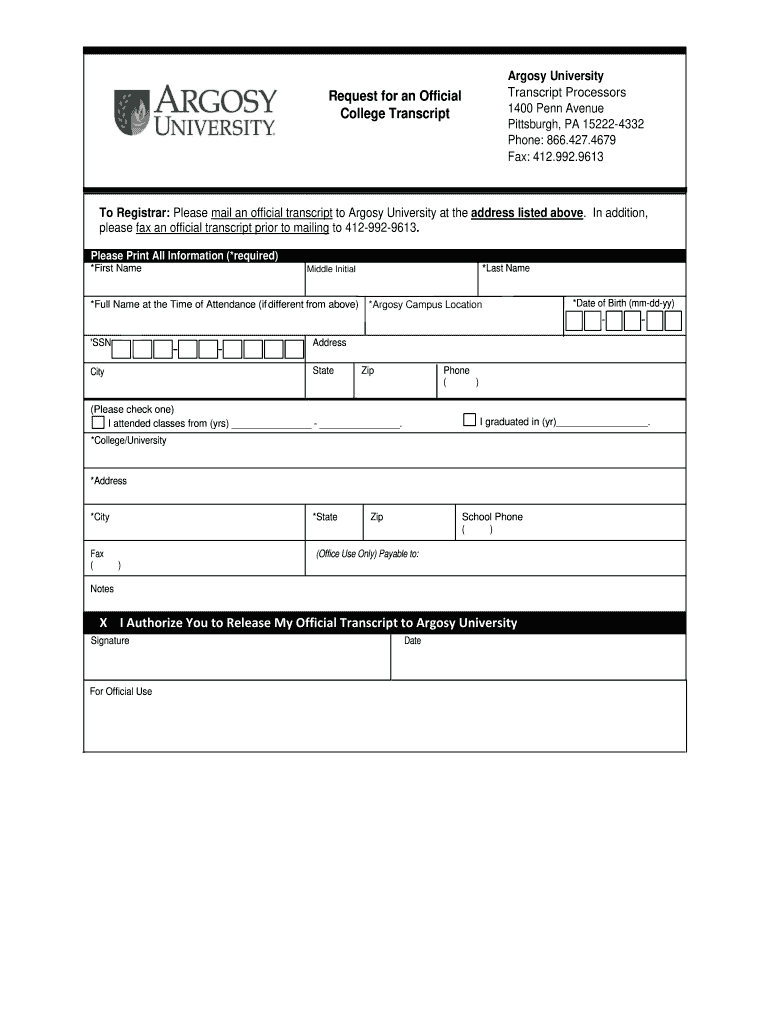
Argosy University Request for an Official College Trancript free printable template
pdfFiller is not affiliated with any government organization

Fill out
Complete the form online in a simple drag-and-drop editor.

eSign
Add your legally binding signature or send the form for signing.

Share
Share the form via a link, letting anyone fill it out from any device.

Export
Download, print, email, or move the form to your cloud storage.
Why pdfFiller is the best tool for your documents and forms


End-to-end document management
From editing and signing to collaboration and tracking, pdfFiller has everything you need to get your documents done quickly and efficiently.
Accessible from anywhere
pdfFiller is fully cloud-based. This means you can edit, sign, and share documents from anywhere using your computer, smartphone, or tablet.
Secure and compliant
pdfFiller lets you securely manage documents following global laws like ESIGN, CCPA, and GDPR. It's also HIPAA and SOC 2 compliant.
What is Argosy University Request for an Official College Trancript
The Argosy University Transcript Request Form is a document used by individuals to request an official transcript from their college or university for submission to Argosy University.
pdfFiller scores top ratings on review platforms




Yes Very satisfied
Yes, my experience was very good and straightforward. I got everything done that I needed to do. Thank you
Works fast and easy
Works fast and easy, great service!I had signed up very briefly to edit some pdfs for work. The program worked smoothly, but then I foolishly forgot to end my membership, and was billed for a years' worth of their service, which I did not need. Their customer support was top-notch and had my problem resolved in just a few minutes. I'd recommend them for anyone looking for a company that is responsive to their customers.
Who needs Argosy University Request for an Official College Trancript?
Explore how professionals across industries use pdfFiller.

Argosy University Request for an Official College Trancript is needed by:
-
Current and former Argosy University applicants
-
Students transferring from other institutions
-
Individuals pursuing further education or job opportunities
-
Academic advisors assisting students
-
Record management departments at universities
Comprehensive Guide to Argosy University Request for an Official College Trancript
What is the Argosy University Transcript Request Form?
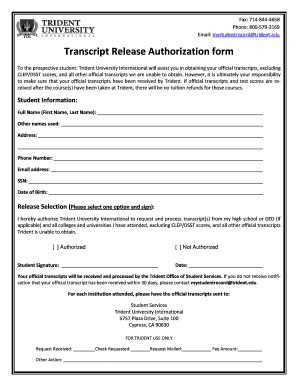
The Argosy University Transcript Request Form serves to facilitate the process of obtaining official transcripts from Argosy University. This essential form requires the applicant to provide personal details, which include their name, date of birth, and Social Security Number (SSN). To ensure the release of the transcript, the form must also bear the applicant's signature, authorizing the transaction.
Purpose and Benefits of the Argosy University Transcript Request Form
This form is indispensable for prospective students or applicants looking to gather academic records. Among the benefits are timely access to academic documents, which may be required for admissions or transfer processes. Utilizing a standardized form streamlines transcript requests, making it user-friendly and efficient for all parties involved.
Key Features of the Argosy University Transcript Request Form
The form boasts various fillable fields that play a critical role in ensuring accurate submission. Important fields include First Name, Last Name, and SSN. The signature requirement signifies the applicant's authorization, while instructions such as 'Please Print All Information' help in preventing errors during completion.
Who Needs to Complete the Argosy University Transcript Request Form?
Potential users of the Argosy University Transcript Request Form include current applicants, students looking to transfer to Argosy University, and alumni seeking their academic records. Specific situations necessitating the request include applying for a new program or submitting documentation for further education.
How to Fill Out the Argosy University Transcript Request Form Online
Filling out the form digitally can be accomplished in a few simple steps. First, gather essential information such as name, date of birth, and SSN before accessing the form. Field-by-field instructions should be followed closely to ensure every detail is accurately completed.
-
Open the Argosy University Transcript Request Form.
-
Enter your personal information in the required fields.
-
Review all entries for accuracy.
-
Sign the form to authorize the request.
-
Follow the submission guidelines provided.
Submission Methods for the Argosy University Transcript Request Form
Submitting the Argosy University Transcript Request Form can be done through mailing or faxing it directly to Argosy University. Be aware of any state-specific requirements that might apply, as well as the timeline expected for processing the request. Timely submission is crucial to avoid delays in obtaining your transcript.
Security and Compliance for Your Transcript Request
Given the sensitivity of the information provided, such as SSN, security is paramount when handling the Argosy University Transcript Request Form. Measures are employed to ensure users’ data is protected while utilizing pdfFiller. Additionally, compliance with data protection regulations like HIPAA and GDPR is adhered to, ensuring a secure request process.
What Happens After You Submit Your Argosy University Transcript Request Form?
Once your transcript request form is submitted, several processing steps will take place. You will have the ability to track the status of your request. In the event of a rejection or if amendments are needed, clear guidelines will be provided on the necessary actions to take.
Tips for Avoiding Common Errors on the Argosy University Transcript Request Form
To ensure a smooth process, it is vital to avoid frequent mistakes commonly made when filling out the form. Double-checking all information beforehand can prevent unnecessary delays. Reviewing the entire form prior to submission is crucial for accuracy.
-
Ensure all personal details are entered correctly.
-
Review the signature for completeness.
-
Check for any mandatory fields that may have been overlooked.
Enhance Your Transcript Request Process with pdfFiller
Utilize pdfFiller to simplify the process of filling out and managing your Argosy University Transcript Request Form. Features such as e-signing and secure document storage enhance user experience significantly. pdfFiller remains committed to providing a secure platform for handling sensitive documents, making the transcript request process efficient and reliable.
How to fill out the Argosy University Request for an Official College Trancript
-
1.Access the Argosy University Transcript Request Form by navigating to pdfFiller and entering the form name in the search bar.
-
2.Open the form in the pdfFiller interface where you will see a variety of fillable fields clearly marked.
-
3.Before starting, gather essential personal information such as your full name, date of birth, SSN, and details about your attendance at the previous institution.
-
4.Click on each field to enter your information systematically, ensuring all data is accurate and legible to prevent any processing delays.
-
5.Take note of the checkbox options for attendance and graduation years, and be sure to mark them appropriately based on your history.
-
6.Review the completed form carefully, ensuring that you have filled all required fields and that the information matches your official records.
-
7.Sign the form in the designated signature line to authorize the release of your official transcript, remembering to print your name as well.
-
8.Once satisfied with your entries, navigate to the save options. You can download the completed form directly, email it, or submit it through pdfFiller’s platform as directed.

Who is eligible to fill out the Argosy University Transcript Request Form?
Anyone who wishes to request their official transcript from a college or university for submission to Argosy University is eligible. This includes current students and alumni of the institution.
What information do I need to provide on the form?
You'll need to provide your personal details, including your full name, date of birth, Social Security Number (SSN), and specific details about your previous attendance and graduation years.
How should I submit the completed transcript request form?
You can submit the completed form by mailing it to the address provided on the form, or by faxing it to the specified fax number. Ensure the signature is included for authorization.
What common mistakes should I avoid when filling out the form?
Common mistakes include providing inaccurate personal information, failing to sign the form, or omitting necessary details about attendance. Double-check all entries before submission.
How long does it take to process my transcript request?
Processing times for transcript requests can vary. It's best to allow at least 5 to 10 business days for handling after submission, but check with Argosy University's admissions office for specific timelines.
Are there any fees associated with requesting a transcript?
There may be fees associated with requesting a transcript. It differs by institution, so, it’s advisable to check the Argosy University website or contact their office for detailed information.
Can I make changes after submitting the transcript request?
Once submitted, changes to the request are generally not allowed unless you contact the admissions office directly. It's important to ensure all information is correct before submission.
Related Content
Related Forms





Get the latest insights from our blog


If you believe that this page should be taken down, please follow our DMCA take down process
here
.
This form may include fields for payment information. Data entered in these fields is not covered by PCI DSS compliance.